
The Hydrographic Data Problem
Published:
This problem is quite an “ancient” problem in the HiMCM competition. The problem is about the hydrographic data problem. Even though the problem is quite old, the problem is still relevant to the current situation. Moreover, I consider this problem can bring an insight into the problem-solving process in mathematical modeling. Therefore, I will discuss the problem in this blog post.
Problem Background
The table below gives the depth Z of water in feet for surface points with rectangular coordinates X, Y in yards. The depth measurements were taken at low tide. Your ship has a draft of five feet. What region should you avoid within the rectangle $(75, 200) \times (−50, 150)$?
| $X$ | $Y$ | $Z$ |
|---|---|---|
| $129.0$ | $7.5$ | $4$ |
| $140.0$ | $141.5$ | $8$ |
| $108.5$ | $28.0$ | $6$ |
| $88.0$ | $147.0$ | $8$ |
| $185.5$ | $22.5$ | $6$ |
| $195.0$ | $137.5$ | $8$ |
| $105.5$ | $85.5$ | $8$ |
| $157.5$ | $−6.5$ | $9$ |
| $107.5$ | $−81.0$ | $9$ |
| $77.0$ | $3.0$ | $8$ |
| $162.0$ | $−66.5$ | $9$ |
| $162.0$ | $84.0$ | $4$ |
| $117.5$ | $−38.5$ | $9$ |
Analysis
For any newbies in mathematical modeling, the problem may seem difficult to solve and quite irrelevant to the real-world problem. However, the problem is quite realistic to me since we sometimes need to determine the depth of water at various points in a region based on the limited data available. One may wonder the reason since we have the technology to measure the depth of water at any point in the ocean. Nevertheless, the measurement may be quite expensive and time-consuming. Therefore, we need to determine the depth of water at various points based on the limited data available.
The problem is a typical problem in hydrographic data analysis. The problem is about determining the depth of water at various points in a region. The depth measurements were taken at low tide, and the ship has a draft of five feet. The goal is to determine the region to avoid within a given rectangle based on the depth measurements.
Mathematical Model
To begin with, we need to determine the depth of water at various points in the region. We can use interpolation to finish the task. However, if you are my students who have read my previous blog posts, you may wonder why I use a new interpolation method instead of the traditional interpolation methods. The reason is that the traditional interpolation methods may not be suitable for this problem since the data points are quite sparse, irregular, and more importantly, the data points are multidimensional. Therefore, I will use the Radial Basis Function (RBF) Interpolation to determine the depth of water at various points in the region.
But before we proceed to Radial Basis Function Interpolation, we need to first understand the concept of Radial Basis Function. Brief overview of Radial Basis Function is given below:
Brief Overview of Radial Basis Function (RBF) Interpolation:
- Concept of Radial Basis Function (RBF):
The Radial Basis Function (RBF) is a mathematical function that depends only on the distance between the input and the center of the function. The RBF is defined as follows:
\[RBF(x, c) = \phi(\|x - c\|)\]Where:
- $x$ is the input vector.
- $c$ is the center of the function.
- $|x - c|$ is the Euclidean distance between the input and the center.
- $\phi$ is a radial basis function that depends on the distance.
- The RBF interpolates the data points by assigning a weight to each data point based on its distance from the input.
- The RBF interpolation is a powerful technique for approximating functions in multidimensional space.
- The RBF interpolation can be used to approximate functions with sparse and irregular data points.
- Algorithm Steps:
- Step 1: Choose the centers of the RBFs.
- Step 2: Calculate the weights for each data point based on its distance from the input.
- Step 3: Calculate the interpolated value at the input by summing the weighted values of the data points.
- Step 4: Repeat steps 2 and 3 for each input to obtain the interpolated values.
- Step 5: Visualize the interpolated values on a map.
But for my students, you DO NOT need to worry about the implementation since I will provide the implementation by using Python especially the scipy library. The following code is the implementation of the solution to the problem.
Solution
Now we implement the solution to the hydrographic data problem using the Radial Basis Function (RBF) Interpolation. We first import the necessary libraries and define the data points.
# Importing the libraries
import numpy as np
from scipy.interpolate import Rbf
import matplotlib.pyplot as plt
Next, we define the data points
# Data points
points = np.array([
    [129.0, 7.5], [140.0, 141.5], [108.5, 28.0], [88.0, 147.0],
    [185.5, 22.5], [195.0, 137.5], [105.5, 85.5], [157.5, -6.5],
    [107.5, -81.0], [77.0, 3.0], [162.0, -66.5], [162.0, 84.0],
    [117.5, -38.5]
])

depths = np.array([4, 8, 6, 8, 6, 8, 8, 9, 9, 8, 9, 4, 9])
We also create a grid of points to interpolate the depth values.
# Create a grid of points to interpolate
x = np.linspace(75, 250, 200)
y = np.linspace(-50, 170, 200)
X, Y = np.meshgrid(x, y)
Now, we perform the Radial Basis Function (RBF) Interpolation to determine the depth of water at various points in the region.
# Perform Radial Basis Function interpolation
rbf = Rbf(points[:, 0], points[:, 1], depths, function='multiquadric', epsilon=2)
Z = rbf(X, Y)
We also add a safety margin to the depth values to account for the ship’s draft of five feet.
# Add a safety margin (0.5 feet)
safety_margin = 0.5
Z_safe = Z - safety_margin
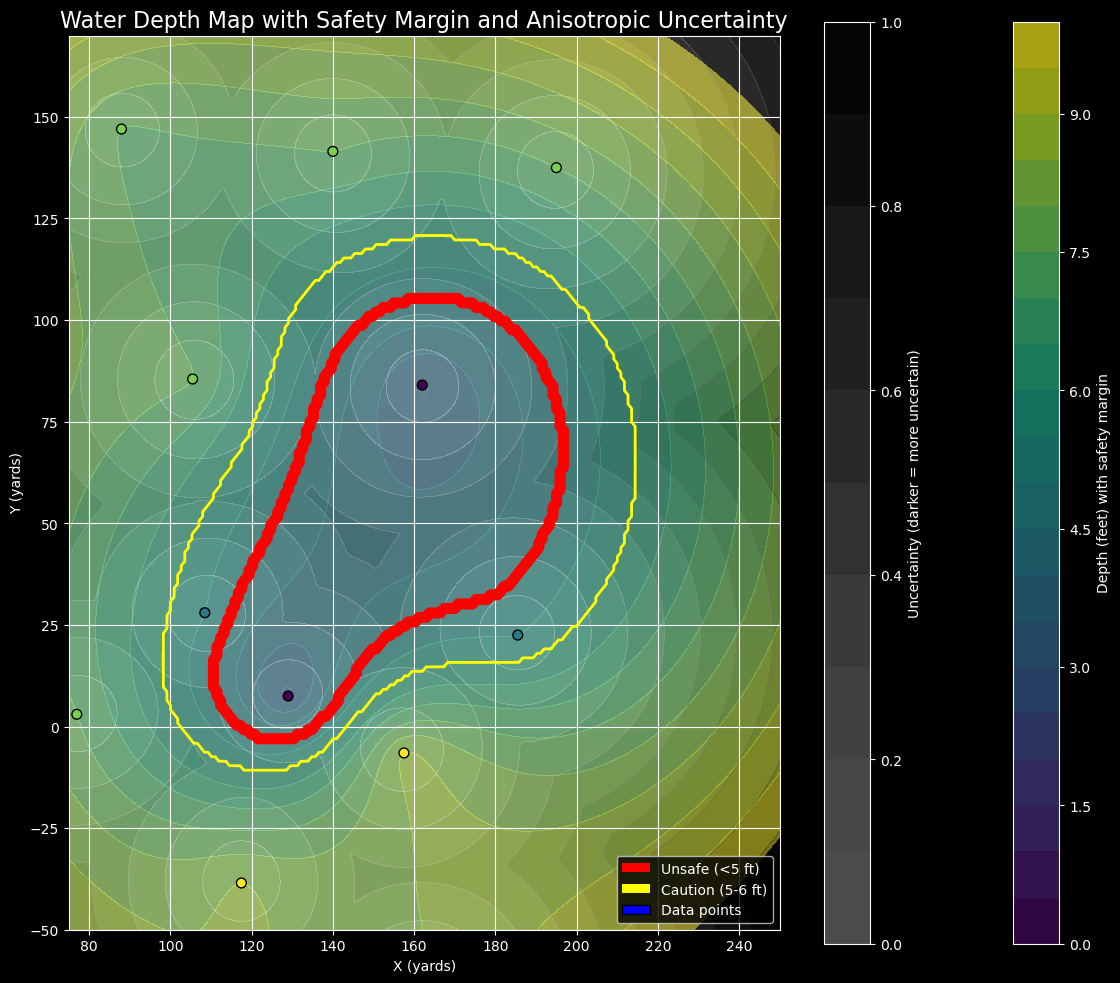
We also create masks for different depth ranges to determine the region to avoid within the rectangle $(75, 200) \times (-50, 150)$.
# Create masks for different depth ranges
mask_unsafe = Z_safe <= 5
mask_caution = (Z_safe > 5) & (Z_safe < 7)
Then we calculate the depth gradient to determine the region to avoid within the rectangle $(75, 200) \times (-50, 150)$.
# Calculate depth gradients
zy, zx = np.gradient(Z)
gradient_magnitude = np.sqrt(zx**2 + zy**2)
We apply the anisotropic distance to the depth gradients to determine the region to avoid within the rectangle $(75, 200) \times (-50, 150)$.
# Anisotropic distance function
def anisotropic_distance(x, y, point, zx, zy):
    dx = x - point[0]
    dy = y - point[1]
    direction = np.arctan2(dy, dx)
    gradient_direction = np.arctan2(zy, zx)
    angle_diff = np.abs(direction - gradient_direction)
    return np.sqrt(dx**2 + dy**2) * (1 + gradient_magnitude * np.cos(angle_diff))
Furthermore, we calculate the anisotropic distance and apply normalization
# Calculate anisotropic distances
distances = np.array([anisotropic_distance(X, Y, point, zx, zy) for point in points])
anisotropic_distance = np.min(distances, axis=0)

# Normalize the distance
max_distance = np.max(anisotropic_distance)
uncertainty = np.clip(anisotropic_distance / max_distance, 0, 1)
Finally, we visualize the interpolated depth values and the region to avoid within the rectangle $(75, 200) \times (-50, 150)$.
# Plot the results
plt.figure(figsize=(12, 10))

# Plot depth contours
contour = plt.contourf(X, Y, Z_safe, levels=np.linspace(0, 10, 21), cmap='viridis', alpha=0.7)
plt.colorbar(contour, label='Depth (feet) with safety margin')

# Plot unsafe and caution areas with different colors but do not cover each other
caution_contour = plt.contour(X, Y, mask_caution, levels=[0.5], colors='yellow', linewidths=2)
unsafe_contour = plt.contour(X, Y, mask_unsafe, levels=[0.5], colors='red', linewidths=4)

# Plot uncertainty
uncertainty_contour = plt.contourf(X, Y, uncertainty, levels=np.linspace(0, 1, 11), cmap='Greys', alpha=0.3)
plt.colorbar(uncertainty_contour, label='Uncertainty (darker = more uncertain)')

# Plot data points
scatter = plt.scatter(points[:, 0], points[:, 1], c=depths, cmap='viridis', edgecolor='k', s=50, zorder=3)

plt.title('Water Depth Map with Safety Margin and Anisotropic Uncertainty', fontsize=16)
plt.xlabel('X (yards)')
plt.ylabel('Y (yards)')
plt.xlim(75, 250)
plt.ylim(-50, 170)

# Create legend
unsafe_patch = plt.Rectangle((0,0),1,1,fc="red", ec="none")
caution_patch = plt.Rectangle((0,0),1,1,fc="yellow", ec="none")
data_point_patch = plt.Circle((0,0),1,fc="blue")

plt.legend([unsafe_patch, caution_patch, data_point_patch],
           ['Unsafe (<5 ft)', 'Caution (5-6 ft)', 'Data points'],
           loc='lower right')
plt.gca().set_aspect('equal', adjustable='box')
plt.grid(True)
plt.tight_layout()
plt.show()
The code above will generate the following plot:
Conclusion
The problem is quite an interesting problem in hydrographic data analysis. Since the task is to determine the depth of water at various points in a region based on the limited data available, we can use the Radial Basis Function (RBF) Interpolation to finish the task. The Radial Basis Function (RBF) Interpolation is a powerful technique for approximating functions in multidimensional space. The RBF interpolation can be used to approximate functions with sparse and irregular data points; moreover, it can also be used to determine the region to avoid within a given rectangle based on the depth measurements. The problem is quite relevant to the current situation since we sometimes need to determine the depth of water at various points in a region based on the limited data available. Therefore, I hope this blog post can bring an insight into the problem-solving process in mathematical modeling.
Comments